Styled text with message entities
Telegram supports styled text using message entities.
A client that wants to send styled messages would simply have to integrate a Markdown/HTML parser, and generate an array of message entities by iterating through the parsed tags.
Nested entities are supported.
Entity length
Special care must be taken to consider the length of strings when generating message entities as the number of UTF-16 code units, even if the message itself must be encoded using UTF-8.
Example implementations: tdlib, MadelineProto.
Unicode codepoints and encoding
A Unicode code point is a number ranging from 0x0 to 0x10FFFF, usually represented using U+0000 to U+10FFFF syntax.
Unicode defines a codespace of 1,112,064 assignable code points within the U+0000 to U+10FFFF range.
Each of the assignable codepoints, once assigned by the Unicode consortium, maps to a specific character, emoji or control symbol.
The Unicode codespace is further subdivided into 17 planes:
- Plane 1:
U+0000toU+FFFF: Basic Multilingual Plane (BMP) - Planes 2-17:
U+00000toU+10FFFF: Multiple supplementary planes as specified by the Unicode standard
Since storing a 21-bit number for each letter would result in a waste of space, the Unicode consortium defines multiple encodings that allow storing a code point into a smaller code unit:
UTF-8
UTF-8 » is a Unicode encoding that allows storing a 21-bit Unicode code point into code units as small as 8 bits.
UTF-8 is used by the MTProto and Bot API when transmitting and receiving fields of type string.
UTF-16
UTF-16 » is a Unicode encoding that allows storing a 21-bit Unicode code point into one or two 16-bit code units.
UTF-16 is used when computing the length and offsets of entities in the MTProto and bot APIs, by counting the number of UTF-16 code units (not code points).
Computing entity length
- Code points in the BMP (
U+0000toU+FFFF) count as 1, because they are encoded into a single UTF-16 code unit - Code points in all other planes count as 2, because they are encoded into two UTF-16 code units (also called surrogate pairs)
A simple, but not very efficient way of computing the entity length is converting the text to UTF-16, and then taking the byte length divided by 2 (=number of UTF-16 code units).
However, since UTF-8 encodes codepoints in non-BMP planes as a 32-bit code unit starting with 0b11110, a more efficient way to compute the entity length without converting the message to UTF-16 is the following:
- If the byte marks the beginning of a 32-bit UTF-8 code unit (all bytes starting with
0b11110) increment the count by 2, otherwise - If the byte marks the beginning of a UTF-8 code unit (all bytes not starting with
0b10) increment the count by 1.
Example:
length := 0
for byte in text {
    if (byte & 0xc0) != 0x80 {
        length += (byte >= 0xf0 ? 2 : 1)
    }
}
Note: the length of an entity must not include the length of trailing newlines or whitespaces, rtrim entities before computing their length: however, the next offset must include the length of newlines or whitespaces that precede it.
Example implementations: tdlib, MadelineProto.
Allowed entities
Manual entities
The following entities need to be manually specified by the user through formatting options.
-
messageEntityBold =>
<b>bold</b>,<strong>bold</strong>,**bold** -
messageEntityItalic =>
<i>italic</i>,<em>italic</em>*italic* -
messageEntityCode» =><code>code</code>,`code` -
messageEntityStrike=><s>strike</s>,<strike>strike</strike>,<del>strike</del>,~~strike~~ -
messageEntityUnderline =>
<u>underline</u> -
Block quote
-
messageEntityPre» =><pre language="c++">code</pre>,```c++ code ```
Cannot be nested inside other entities.
-
messageEntitySpoiler => Used to hide certain parts of a message behind an animated spoiler: the underlying text is revealed only by a manual click
-
inputMessageEntityMentionName/messageEntityMentionName => Mention a user by ID/username
-
messageEntityCustomEmoji => used for custom emojis »
-
messageEntityFormattedDate => used to point at a specific point in time, rendered as specified here »; cannot be nested inside other entities.
Date entities
messageEntityFormattedDate#904ac7c7 flags:# relative:flags.0?true short_time:flags.1?true long_time:flags.2?true short_date:flags.3?true long_date:flags.4?true day_of_week:flags.5?true offset:int length:int date:int = MessageEntity;
The messageEntityFormattedDate entity represents a specific point in time.
The date field must be populated with a UNIX timestamp, that can range from 0 to the current date plus 1098 days (time()+1098*86400).
Clicking on this entity should bring up a context menu with three options:
- Copy the date (formatted using the
long_date+long_timeformat, regardless of the value of the flags) to the clipboard - Add the date to the system calendar
- Schedule a reminder, by scheduling the message to saved messages, invoking messages.forwardMessages with the ID of the current message,
schedule_dateset to the date specified in this entity andto_peer=inputPeerSelf
If none of the optional flags are set, the selected text should be rendered as a link, without changes to the text itself.
Otherwise, it should be rendered as a link, replacing the text with the date rendered using the current user's timezone and the format specified by the provided flags:
-
relative: if set, render a relative date, i.e.In 1 second/minute/hour/day/week/month/yearor1 second/minute/hour/day/week/month/year ago.
Round down to the closest unit only, for example, depending on the value passed todate:time()+10-in 10 secondstime()+60+10-in 1 minutetime()+3600+60+10-in 1 hourtime()+86400+60+10-in 1 daytime()+31*86400+86400+60+10-in 1 monthtime()+365*86400+31*86400+86400+60+10-in 1 year
And the same for dates in the past:
time()-10-10 seconds agotime()-60-10-1 minute agotime()-3600-60-10-1 hour agotime()-86400-60-10-1 day agotime()-31*86400-86400-60-10-1 month agotime()-365*86400-31*86400-86400-60-10-1 year ago
The date must be updated in realtime by the client when the message is visible by the user, according to the current date.
-
short_time: renders the time in short format: hours and minutes, according to the user's locale settings -
long_time: renders the time in long format: hours, minutes, seconds and maybe timezone, according to the user's locale settings -
short_date: renders the time in short format: month, date, (and year, if different from the current one), all according the user's locale settings. -
long_date: renders the time in long format: always month, date and year, all according the user's locale settings. -
day_of_week: renders the day of the week according to the user's locale settings.
All flags are optional, with the following limitations:
relativecannot combined with any other flagshort_timeandlong_timecannot be combined with each othershort_dateandlong_datecannot be combined with each other
If any of the flags are combined, their rendering order in the text is the following:
day_of_weekshort_time/long_timeshort_date/long_date
The maximum text span that can be covered by a date entity is 31 UTF-16 code units if any of the date formatting flags is set, or 127 UTF-16 code units without.
Autogenerated entities
The following entities are automatically generated by the server for URLs, hashtags, emails, bot commands, etc, simplifying the message rendering logic for clients (so they don't have to implement autolinking for URLs and other common clickable sections).
These entities turn certain sections of the message blue and make them clickable, triggering a specific action:
- messageEntityMention => Used to mention a user/channel/supergroup by @username, generated automatically server-side for @usernames in messages: when pressed, should bring up the target's profile.
- messageEntityHashtag => For
#hashtags: when clicked, the client should search for all messages with the specified hashtag in the current chat » - messageEntityCashtag => For
$cashtags: when clicked, the client should search for all messages with the specified cashtag in the current chat » - messageEntityBotCommand => For bot
/commands: when clicked in a group or private chat, the client should send the same command within the chat - messageEntityUrl => For plain text URLs and deep links: when clicked, the client should open the link in the in-app browser.
- messageEntityEmail => For emails: when clicked, the client should invoke the default intent used to send emails, opening the preferred email client.
- messageEntityBankCard => For bank card numbers: when long-pressed, should invoke payments.getBankCardData, passing the card number to
number
Note that clients still have to manually add the entities specified above to messages when sending messages to E2E secret chats », since the server cannot inspect and modify messages sent to E2E-encrypted secret chats.
Diff entities
messageEntityDiffInsert#71777116 offset:int length:int = MessageEntity;
messageEntityDiffDelete#0652c1c5 offset:int length:int = MessageEntity;
messageEntityDiffReplace#c6c1e5a7 offset:int length:int old_text:string = MessageEntity;

textWithEntities#751f3146 text:string entities:Vector<MessageEntity> = TextWithEntities;
Diff entities are currently only returned by the AI composer », and cannot be used in normal messages.
Diff entities simplify the client-side logic, by letting the server pre-generate the diff between two texts.
These entities are rendered only within the context of the containing textWithEntities: no other information apart from text and entities is needed (i.e. no need to do any diffing manually).
- messageEntityDiffInsert - Represents an addition: render it by simply underlining the section delimited by
offsetandlimitand coloring it in green. - messageEntityDiffInsert - Represents a deletion: render it by simply underlining the section delimited by
offsetandlimitand coloring it in red. - messageEntityDiffReplace - Represents a replacement, render it by:
- Inserting messageEntityDiffReplace.
old_textinto the text at offsetoffset, underlining it and coloring it in red: note that this insertion does not affect the offsets of entities that come after it. - underlining the section delimited by
offsetandlimitand coloring it in green.
- Inserting messageEntityDiffReplace.
For example the following diff:
{
    "_": "textWithEntities",
    "text": "Hi,\n\nCould you please please proofread this message and correct any mistakes?\n\nThanks thanks.",
    "entities": [
        {
            "_": "messageEntityDiffReplace",
            "offset": 5,
            "length": 1,
            "old_text": "c"
        },
        {
            "_": "messageEntityDiffDelete",
            "offset": 22,
            "length": 7
        },
        {
            "_": "messageEntityDiffInsert",
            "offset": 42,
            "length": 1
        },
        {
            "_": "messageEntityDiffReplace",
            "offset": 66,
            "length": 1,
            "old_text": "uuu"
        },
        {
            "_": "messageEntityDiffDelete",
            "offset": 85,
            "length": 7
        }
    ]
}
Is rendered like this:
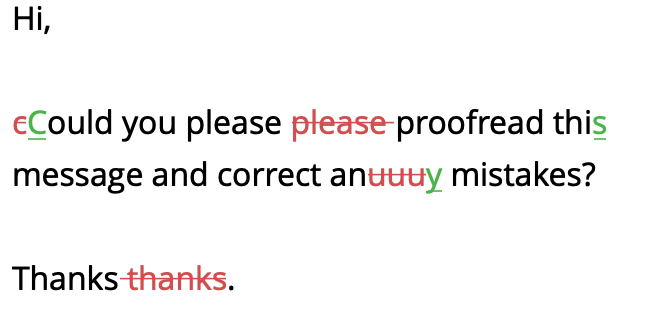
Note how the final messageEntityDiffDelete's offset is not changed by the uuu inserted by the preceding messageEntityDiffReplace.